Code Wave Build Log
I made a game called Code Wave for the recently completed GitHub Game Off 2025!
I really enjoy game development, but don’t get to do it often. When I saw that the theme this year for the Game Off was WAVES, I thought that it would be fun to do something creative with it!
Before I continue, if you want to play other entries, you can see all of the submissions to the Game Off here on Itch.io.
How the game is played
Code Wave is a top-down 2D game, where the player collects letters to form words while avoiding enemies.
The player, for each level, has to collect the letters of a word. Once they get all of the letters for a given level, they are able to cross a body of water (to match the WAVES theme!) to reach the next level. The “finish line” on each level is across the water, and once they cross it, they go to the next level.
The inspiration behind this was the classic game Spelling Jungle, if you know it!
The words for all 10 levels are as follows:
- AI
- Git
- Code
- Merge
- Commit
- Branch
- GitHub
- Program
- Copilot
- Developer
So, as you can see, it gets a liiittttle harder with longer words at each level. The number of enemies increases at each level, too. There’s bombs that stay in one place, and then randomly moving hovercrafts.
There’s three difficulty levels that change the gameplay slightly, and how the enemies affect you:
- Easy: The player can find/get letters in any order, and enemies restart the level.
- Medium: The player can find/get letters in any order, but enemies restart the level and the player loses all of their collected letters.
- Hard: The player has to find/get letters in the correct order of the word, and enemies restart the level and the player loses all of their letters (kind of turns it into a memory game).
The goal is to get through all 10 levels as fast as possible! It can get kind of hard depending on where the hovercrafts end up (which again, is totally random). I think my fastest time is 6m23s, if you want to try to beat that!
Technologies and tools
I didn’t have a ton of time to work on Code Wave, because when the game jam started, I was fresh off of maternity leave and had limited computer time outside of work. So, I opted for tech that I know relatively well: Phaser, and good ol’ vanilla JavaScript.
I first used Phaser when I built my game Thirteen Potions for a game jam a couple years ago (build log here), and luckily I remembered how the basics worked.
That being said, when I made Thirteen Potions, I was very limited in file size (because it was for a game jam based on tiny games, see the build log), so this time I felt VERY free about using the starter “Create Game App” tool. I used the basic “Web Bundler” option with Vite, and it scaffolded out some files for me.
Art-wise, I used Aseprite for editing pixel art, which I initially got from Kenney, and a custom (very cute) GitHub Mona character that I got from a designer at GitHub who I nerd-sniped into making it.
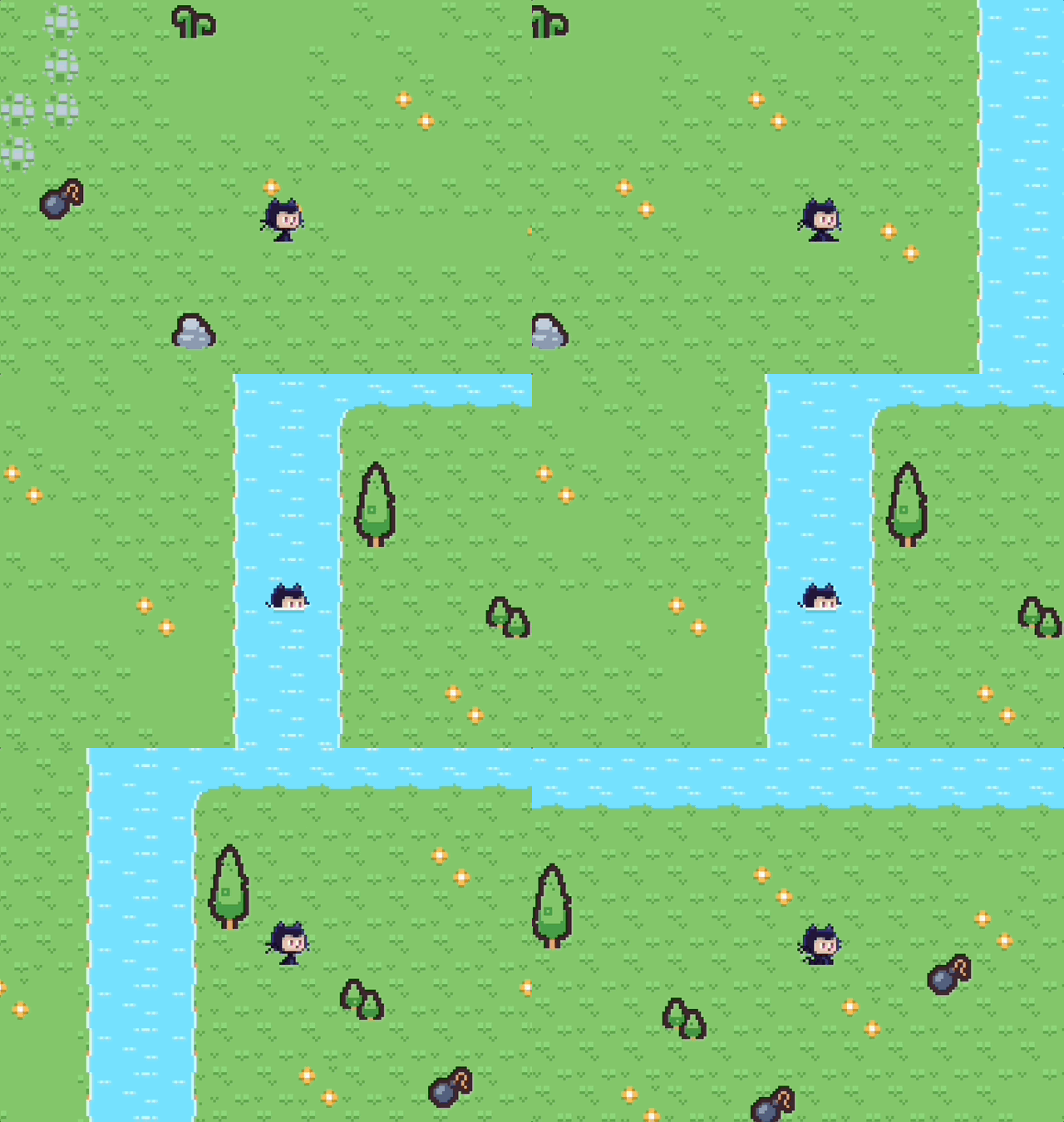
To make the map, I used the Tiled map editor, and imported my pixel art into it (more on that in a sec).
And finally, for the background music, it’s a song called A Heart of Pixels by Christoffer Moe Ditlevsen, which I licensed for the game! I also used some sound effects from Kenney (again), and custom made some myself just in Audacity.
Making the map
In case you haven’t used it, Tiled lets you export your maps as JSON, and lets you label tiles and layers however you’d like!
Thank goodness, I knew how to work with Tiled and the pitfalls of it after Thirteen Potions (for example, it’s much easier to have an entire layer dedicated to collisions, rather than individual tile types).
It was particularly manual to make all 10 levels (and I openly admit I thought a few times, “could AI do this?” as I had to make individual edits repeatedly, often), but I did it! Hand-crafted! It took a while to get it all right.
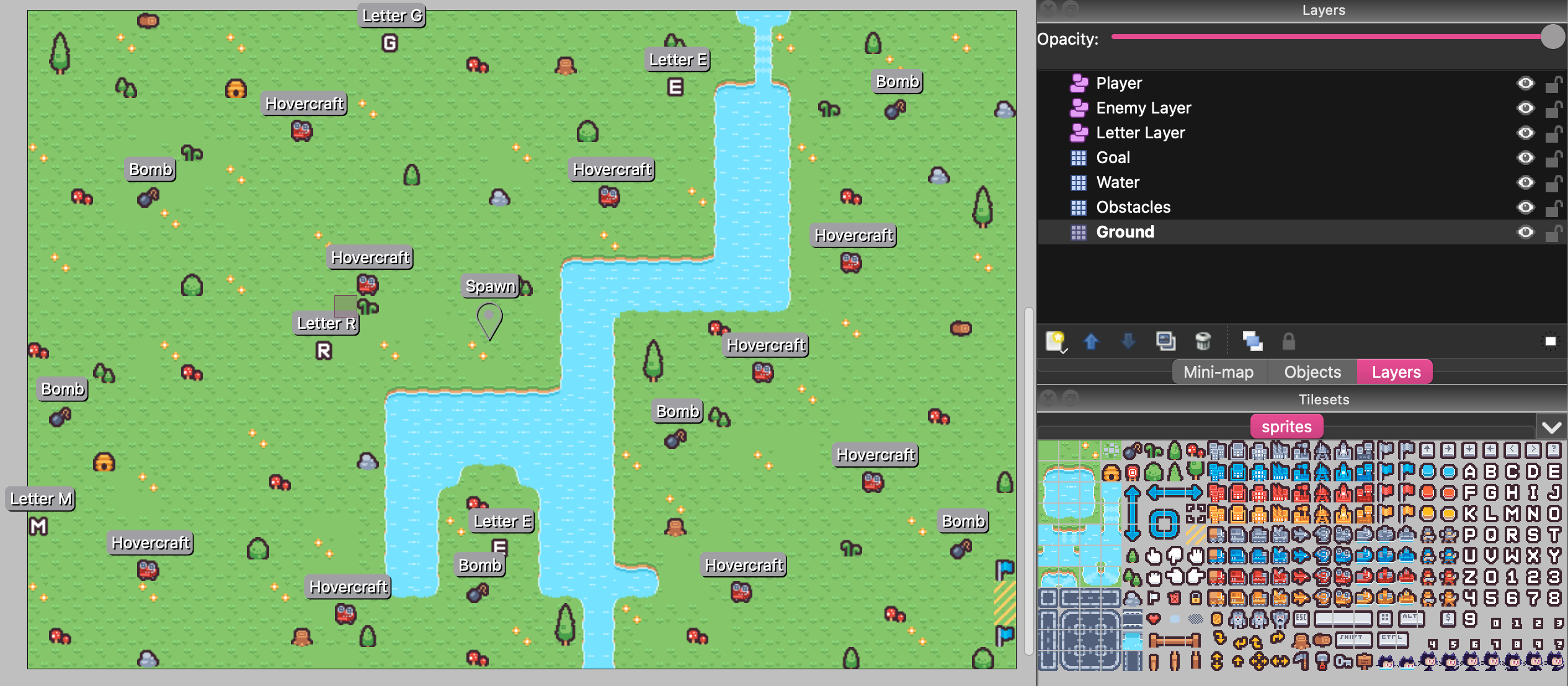
I had seven layers for each level:
- A ground layer, for… the ground
- An obstacles layer for various plants and trees and stuff that players can’t walk on
- A water layer, which initially players collide with until they collect all the letters
- A goal layer, which advances the player to the next level
- A letter layer, for all of the letters per word
- An enemy layer, for the bombs and hovercrafts
- A player layer, which just has the player spawn point
My spritesheet I made (which you can see in the above screenshot in the bottom right) was a bit overkill for the game (I combined a bunch of tilesets thinking I’d have way more enemies and obstacles), but it worked well for all of the layers in a compact image.
I remade and re-saved and re-configured these maps… more times than I can remember. It was hours. It was overkill. Please admire them.
Actually coding
Okay, once I had allll of my configuration set up with Phaser’s Create Game App, all of my sprites and tiles managed, all of my music and sound effects ready, it was time to actually start building. I had a plan, and I reviewed Thirteen Potions pretty extensively, since I wanted my camera, player, and enemy movement to be mostly the same.
I used GitHub Copilot relatively heavily for some of the boilerplate, and it helped me speed up a lot so I could focus on the more fun parts of the codebase, which was great.
Breaking it down, here’s the structure of how the code was set up:
Scenes
- Boot.js + Preloader.js
- Loads all 10 level maps
- Loads the sprite sheet, background music, sound effects, and background image
- Game.js
- Handles difficulty configuration
- Handles sprite movement
- Includes a status UI in the top left of the current word, collected letters, and time
- Manages collisions with obstacles and water
- Initially blocks player from crossing water, but allows it after collecting all letters
- Player sprite toggles “swimming” mode when on/off water
- Manages enemy collision
- Player blinks red and respawns
- Camera logic
- Zooming in and following player
- Extra “fake” camera for the status UI (which was hacky but neat)
- Letter collection
- Checking difficulty level in case a letter isn’t eligible to be collected
- Adding the letter to the status UI
- Checks if player is on goal tile with all letters and advances to the next level
- Keyboard and mouse navigation and shortcuts
Overlay scenes
These are aptly named so I’m not going to go into them too deeply:
- GameOver.js
- HowToPlay.js
- MainMenu.js
- Pause.js
In retrospect, there’s some things I wish I cleaned up but didn’t. The overlay screens all had juuust enough repetition that I should have made just an Overlay component and reused it (that being said I did make some reusable buttons for those, so that helped). The Boot and Preloader scenes should probably be combined. The Game scene definitely should be broken up more. There’s a “virtual joystick” component that mostly works if someone is playing on mobile, but is moderately janky. I could have tightened up how I handled some of the sprite collisions.
BUT. The game works. It can use keyboard navigation or a mouse or a finger. The music can be muted. Players can pause easily. It looks dang cute. I’m gonna just live with the little wins!
Hoorah!
I didn’t expect Code Wave to win any fabulous awards (once again, you can see and play all of the submissions to the Game Off, and you should), but I had a really fun time putting it together and ultimately playing it.
If you’d like to see more of how it works, you can check out the repository, or play it again!